Automated Data Lineage Tools: Boost Accuracy and Efficiency Now
Are you struggling to keep track of where your data comes from and how it moves through your systems? Automated data lineage tools can be the solution you need.
They help you see the full path of your data, making it easier to trust, manage, and protect. Imagine saving hours of manual work while gaining clear insights into your data’s journey. Keep reading to discover how these tools can transform the way you handle data and boost your confidence in every decision you make.
Importance Of Data Lineage
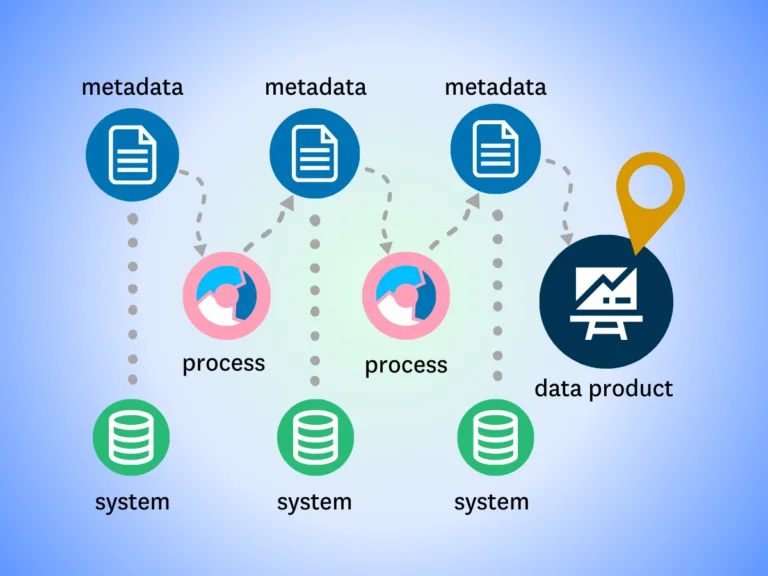
Data lineage shows the path data takes through systems. It tracks data from its source to its final form. Understanding this flow is key for many reasons. It helps businesses trust their data and use it wisely. Without clear data lineage, errors can stay hidden. Problems in data can cause wrong decisions. Data lineage tools help spot these issues fast. They make it easier to fix data problems.
Enhances Data Transparency
Data lineage makes data clear and open. It shows exactly where data comes from. Users can see how data changes over time. This transparency builds trust in data results.
Supports Compliance And Auditing
Many laws require proof of data handling. Data lineage provides this proof quickly. It shows data history and movements. This helps businesses pass audits without stress.
Improves Data Quality
Tracking data flow helps find errors early. Fixing issues improves data accuracy. High-quality data leads to better business insights. Data lineage tools support ongoing data health.
Speeds Up Troubleshooting
When data issues arise, time is critical. Data lineage helps find the problem source fast. It saves time and reduces downtime. Quick fixes keep business processes smooth.
Facilitates Better Decision-making
Decisions need reliable and clear data. Data lineage ensures data reliability. Leaders can trust the data they use. This leads to smarter, safer choices.
Challenges With Manual Data Lineage
Tracking data manually is hard and takes a lot of time. It involves writing down where data comes from and how it moves. This process often causes mistakes and misses important details. Teams can waste hours fixing errors caused by poor data tracking. Manual data lineage does not keep up with fast changes in data systems. This creates confusion and slows down decision-making. It is difficult to trust data when its history is unclear or incomplete. These problems affect the quality and use of data in any business. Time-Consuming and Labor-Intensive Manual data lineage requires many hours of work by skilled staff. Every data source and step must be recorded carefully. This slows down projects and adds costs. People may skip steps or miss updates due to workload. People make mistakes when tracking data manually. Errors in documentation can cause wrong data flows. Fixing these errors takes extra time. Wrong lineage leads to poor decisions and lost trust in data. Difficulty Handling Complex Data Systems Modern data environments have many sources and layers. Manual methods struggle to keep track of all changes. It is hard to update lineage maps quickly. This causes outdated or incomplete lineage informationLack of Real-Time Updates Manual tracking cannot provide data lineage in real time. Teams must wait for reports or reviews. This delay reduces agility and slows problem-solving. Real-time insights are critical for effective data use.
How Automation Enhances Accuracy
Automated data lineage tools improve the accuracy of tracking data flow. They reduce errors that happen with manual tracking. Automation follows every step data takes, making the record clear and precise. These tools scan data systems quickly. They catch changes and updates right away. This helps keep data maps up to date without mistakes.
Consistent Data Tracking Across Systems
Automation applies the same rules to all data sources. This stops human errors from different methods or habits. It ensures data paths are recorded the same way each time.
Real-time Error Detection
Automated tools spot errors instantly. They alert teams about issues in data flow early. Fixing problems fast prevents wrong data from spreading.
Clear And Detailed Data Maps
Automation creates detailed and easy-to-read data maps. These maps show where data comes from and where it goes. Clear maps help teams trust the data’s accuracy.
Reduced Human Mistakes
Manual tracking can miss steps or details. Automation removes guesswork and tiredness from the process. This lowers the chance of wrong data lineage records.
Credit: www.ovaledge.com
Efficiency Gains From Automated Tools
Automated data lineage tools help businesses track data flow across systems. These tools save time by mapping data paths quickly and accurately. Teams spend less time on manual tracing and more on analysis. Automation reduces errors in data tracking. This leads to better decisions based on reliable data. Efficiency improves as updates happen in real time without delays.
Faster Data Mapping And Visualization
Automated tools create visual maps of data movement instantly. Users see the entire data journey in one view. This speeds up understanding of complex data systems. Manual drawing of data flow takes hours or days. Automation completes this task in minutes. It helps teams spot issues and fix them faster.
Reduced Manual Effort And Errors
Manual data lineage tracking is slow and prone to mistakes. Automation removes repetitive work and human errors. It ensures data paths are accurate and consistent. Teams save hours that they would spend checking data links. This frees them to focus on improving data quality and governance.
Real-time Updates And Alerts
Automated tools monitor data changes continuously. They alert teams to any new data sources or changes. This keeps data lineage always current without extra work. Real-time updates help prevent data risks early. Teams respond to issues faster, reducing downtime and errors.
Key Features Of Automated Lineage Tools
Automated data lineage tools help track the flow of data across systems. They show where data comes from, how it changes, and where it goes. This visibility helps teams trust their data and meet compliance rules. These tools come with important features that make data tracing easier and faster. They reduce manual work and show clear data paths. Here are the key features of automated lineage tools. HTML Syntax:
Automated Data Discovery
Automated data discovery scans all data sources. It finds data tables, columns, and files without manual input. This saves time and ensures no data source is missed. HTML Syntax:
Visual Lineage Maps
Visual maps display data flow in simple diagrams. Users see data origin, transformations, and destinations. These maps make complex data easier to understand. HTML Syntax:
Impact Analysis
Impact analysis shows how data changes affect systems. It helps predict risks before updating data or code. Teams use this to avoid errors and downtime. HTML Syntax:
Real-Time Lineage Tracking
Real-time tracking updates lineage as data moves. It shows live changes and alerts for issues. This keeps data accuracy high and problems visible fast. HTML Syntax:
Integration with Data Tools
These tools connect with databases, ETL platforms, and BI tools. Integration ensures consistent lineage across all data environments. It supports smooth workflows and data governance.
Selecting The Right Automation Solution
Selecting the right automated data lineage tool can shape your data management success. Choosing the right tool helps track data flow clearly. It prevents errors and saves time by showing data origins and transformations. Each tool offers different features and suits various needs. Understanding your data environment and goals guides the choice. Focus on tools that fit your current system and grow with your business.
Understanding Your Data Environment
Know the types of data your business handles. Identify where data comes from and where it goes. Recognize how data changes through your system. This knowledge helps pick tools that match your setup.
Evaluating Tool Features
Look for features like automatic tracking and clear visualization. Check if the tool supports multiple data sources. Consider how it handles data updates and changes. Simple user interface is important for easy use.
Checking Integration Capabilities
Ensure the tool works well with your existing software. Confirm it connects smoothly to databases and cloud services. Integration ease reduces setup time and errors. Compatibility is key to seamless operation.
Assessing Scalability And Flexibility
Choose tools that grow with your data needs. The tool should handle increasing data volumes. Flexibility to add new sources or processes matters. This prevents early tool replacement and extra costs.
Reviewing Support And Documentation
Good customer support helps solve issues quickly. Look for clear guides and tutorials. Documentation assists users in learning the tool fast. Reliable support improves user confidence and tool use.
Future Trends In Data Lineage Automation
Data lineage automation is evolving fast. New tools help track data flow more clearly. This change makes data management easier and more reliable. Future trends focus on making these tools smarter and more user-friendly. They aim to provide better insights and reduce manual work. These trends shape how businesses handle data in coming years.
Ai And Machine Learning Integration
AI helps automate data mapping with less human input. Machine learning improves accuracy in tracing data origins. These technologies detect patterns and errors quickly.
Real-time Data Lineage Tracking
Future tools will track data changes instantly. This helps businesses react faster to data issues. Real-time updates improve decision-making and compliance.
Cloud-native Data Lineage Solutions
Cloud-based tools offer more flexibility and scalability. They support hybrid and multi-cloud environments. Cloud solutions simplify data lineage for distributed data sources.
User-friendly Visualization
Visual tools will become more interactive and easy to use. Clear diagrams help users understand complex data flows. Better visuals support faster problem solving.
Enhanced Data Privacy And Compliance
Automated tools will include stronger privacy controls. They ensure data handling meets regulations. Compliance features reduce risks and build trust.
Credit: www.montecarlodata.com
Credit: www.ovaledge.com
Frequently Asked Questions
What Are Automated Data Lineage Tools?
Automated data lineage tools track how data moves and changes across systems. They help visualize data flow and transformations. This makes data easier to understand and trust.
Why Use Automated Data Lineage Tools In Businesses?
They improve data accuracy and compliance by showing data origins clearly. Businesses save time by reducing manual tracking. This leads to better decisions and fewer errors.
How Do Automated Data Lineage Tools Improve Data Governance?
These tools map data paths and changes automatically. They help spot errors and risks quickly. This supports rules that keep data safe and reliable.
Can Automated Data Lineage Tools Work With Cloud Systems?
Yes, many tools support cloud platforms and hybrid setups. They track data across both local and cloud systems. This ensures full visibility no matter where data lives.
What Features To Look For In Data Lineage Tools?
Look for easy visualization, automation, and integration with your data sources. Real-time tracking and reporting are also key features. These help keep your data lineage clear and up to date.
Conclusion
Automated data lineage tools help track data flow clearly and quickly. They reduce errors and save time for teams. These tools improve data trust and support better decisions. Using them leads to easier compliance with rules. Choosing the right tool depends on your needs and budget.
Start small and grow your data tracking step by step. Clear data paths make work smoother and safer. Automated data lineage is a smart step for any data-driven business.