Best Marketing Automation Tools: Boost Sales & Save Time Fast
Are you tired of juggling endless marketing tasks that eat up your time and energy? Imagine having a tool that works behind the scenes, helping you connect with your audience, boost sales, and grow your business—all without constant effort from you.
Choosing the right marketing automation tool can make this a reality. You’ll discover the best marketing automation tools designed to simplify your work and deliver real results. Keep reading to find the perfect fit for your needs and watch your marketing game reach new heights.
Best Marketing Automation Tools
Top Marketing Automation Platforms help businesses save time and improve their marketing results. These tools automate repetitive tasks like email campaigns, social media posting, and lead management. Choosing the right platform can boost efficiency and increase sales.
Hubspot Marketing Hub
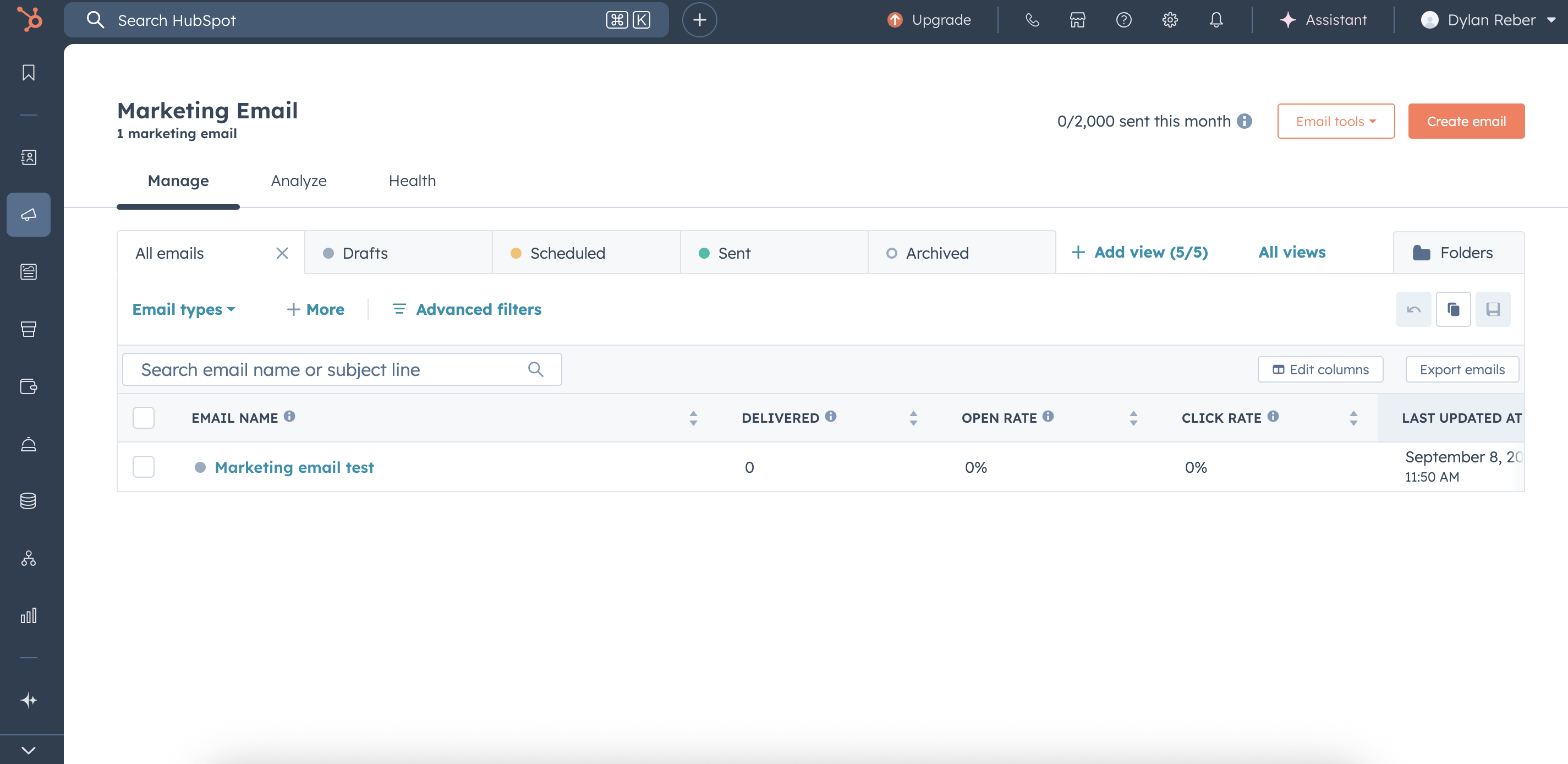
HubSpot Marketing Hub is popular for its easy-to-use interface and powerful features. It offers tools for email marketing, lead tracking, and analytics. Users can create personalized campaigns without coding skills.
- Key Features: Email automation, landing pages, CRM integration
- Best For: Small to medium businesses
- Pricing: Free plan available; paid plans start at $45/month
Mailchimp
Mailchimp is known for its simple email marketing tools and automation workflows. It helps businesses send targeted emails based on customer behavior. The platform also supports social ads and audience segmentation.
- Key Features: Email sequences, audience insights, A/B testing
- Best For: Beginners and small businesses
- Pricing: Free plan; paid plans start at $11/month
Activecampaign
ActiveCampaign combines email marketing, automation, and CRM. It offers advanced automation with triggers and conditions. This platform suits businesses wanting detailed customer journeys.
- Key Features: Automated workflows, sales automation, messaging
- Best For: Growing businesses needing advanced automation
- Pricing: Plans start at $29/month
Marketo Engage
Marketo Engage focuses on B2B marketing automation. It offers lead management, email marketing, and analytics tools. Large companies often use it for complex campaigns.
- Key Features: Lead scoring, account-based marketing, campaign management
- Best For: Enterprises and large businesses
- Pricing: Custom pricing based on business needs
Comparison Table Of Top Platforms
| Platform | Best For | Key Features | Starting Price |
|---|---|---|---|
| HubSpot Marketing Hub | Small to medium businesses | Email automation, landing pages, CRM | Free / $45/month |
| Mailchimp | Beginners and small businesses | Email sequences, audience insights, A/B testing | Free / $11/month |
| ActiveCampaign | Growing businesses | Automated workflows, sales automation | $29/month |
| Marketo Engage | Enterprises and large businesses | Lead scoring, ABM, campaign management | Custom pricing |
Credit: pwskills.com
Features To Look For
Choosing the right marketing automation tool means finding one with the best features for your business needs. These features help save time, improve campaigns, and increase sales. Knowing what to look for makes it easier to pick the right tool.
Ease Of Use And User Interface
The tool should be simple to use. A clean and clear interface helps you work faster. Easy navigation means less time learning and more time doing. Look for drag-and-drop builders and simple menus.
Lead Management And Segmentation
Good tools let you organize your contacts well. You should be able to segment leads by behavior, location, or interests. This helps send the right message to the right audience. Automated lead scoring is a plus.
Multi-channel Campaign Support
The tool must support different marketing channels. Email, social media, SMS, and landing pages are common. Managing campaigns from one place saves effort and keeps data organized.
Automation And Workflow Capabilities
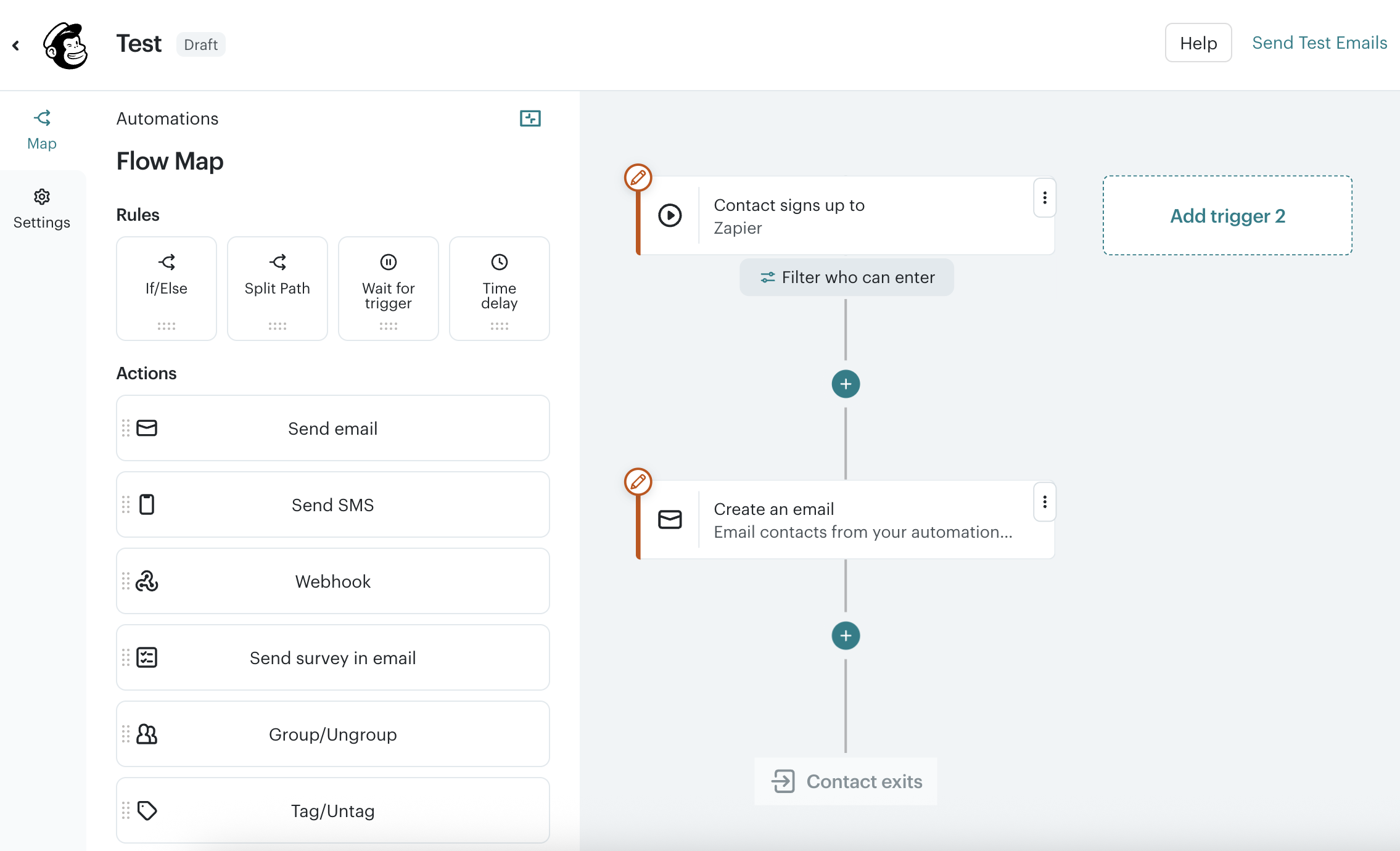
Look for tools that allow building custom workflows. Set triggers, actions, and conditions easily. Automation saves manual work and ensures timely responses to customer actions.
Analytics And Reporting
Tracking results is key. The tool should offer clear reports on campaign performance. Metrics like open rates, clicks, and conversions are important. Visual charts and data export options help analyze better.
Integration With Other Tools
The automation tool should connect with your existing software. CRM, e-commerce platforms, and social tools matter most. Smooth integration means all your data works together.
Customer Support And Resources
Reliable support helps solve problems fast. Check if the tool offers live chat, tutorials, or a knowledge base. Good support reduces downtime and improves your experience.
| Feature | Why It Matters | What to Check |
|---|---|---|
| Ease of Use | Faster adoption and less training | Simple interface, drag-and-drop, tutorials |
| Lead Management | Better targeting and personalization | Segmentation, lead scoring, contact tagging |
| Multi-Channel Support | Reach customers on preferred platforms | Email, SMS, social media, landing pages |
| Automation Workflows | Saves time, ensures timely actions | Custom triggers, actions, conditional logic |
| Analytics | Measures success and areas to improve | Reports, charts, export options |
| Integration | Keeps all marketing tools connected | CRM, e-commerce, social media platforms |
| Customer Support | Quick help and learning resources | Live chat, tutorials, help center |
Email Marketing Automation
Email marketing automation simplifies sending emails to many people. It saves time and helps send the right message to the right person. Automated emails can welcome new subscribers, remind customers about items left in carts, and share special offers. These tools help businesses grow by making email campaigns easier and more efficient.
Email List Management
Email list management organizes contacts into groups. This helps send targeted messages based on interests or actions. Good tools let you:
- Import and export contacts easily
- Segment lists by behavior or demographics
- Remove inactive subscribers automatically
Managing lists improves email relevance and increases open rates.
Personalized Email Campaigns
Personalized emails feel more meaningful to readers. Automation tools allow you to:
- Use customer names in emails
- Send birthday or anniversary greetings
- Recommend products based on past purchases
This creates better engagement and stronger relationships.
Automation Workflows
Automation workflows are step-by-step email sequences sent automatically. They guide customers through actions like:
- Welcoming new subscribers
- Following up after purchases
- Re-engaging inactive users
Workflows save time and keep communication consistent.
Analytics And Reporting
Analytics show how well emails perform. Key metrics include:
| Metric | Description | Why It Matters |
|---|---|---|
| Open Rate | Percentage of people who open the email | Shows subject line effectiveness |
| Click-Through Rate | Percentage who click links inside the email | Measures engagement with content |
| Bounce Rate | Emails that could not be delivered | Helps maintain a healthy list |
| Unsubscribe Rate | People who opt out of emails | Indicates email relevance |
Good tools provide detailed reports to improve campaigns.
Social Media Automation Tools
Social media automation tools help businesses save time and keep their accounts active. These tools schedule posts, track engagement, and manage multiple platforms from one place. They make it easier to reach the right audience regularly without manual effort.
What Are Social Media Automation Tools?
These tools automate tasks like posting content, replying to comments, and tracking results. They support platforms such as Facebook, Twitter, Instagram, and LinkedIn. By automating routine work, teams focus more on creating quality content and strategy.
Key Features To Look For
- Scheduling: Plan posts in advance for consistent updates.
- Multi-platform support: Manage several social accounts from one dashboard.
- Analytics: Track engagement, clicks, and follower growth.
- Content library: Store and reuse posts easily.
- Team collaboration: Allow multiple users to work together.
Popular Social Media Automation Tools
| Tool | Main Features | Best For |
|---|---|---|
| Buffer | Simple scheduling, analytics, team collaboration | Small to medium businesses |
| Hootsuite | Multi-platform support, monitoring, reporting | Large teams and agencies |
| Later | Visual content calendar, Instagram focus | Visual brands and influencers |
| Sprout Social | Advanced analytics, customer engagement | Businesses needing deep insights |
Benefits Of Using Social Media Automation Tools
- Time-saving: Schedule posts once and publish automatically.
- Consistency: Maintain regular posting to engage followers.
- Better planning: Visual calendars help organize campaigns.
- Improved response: Manage comments and messages faster.
- Data-driven decisions: Use insights to improve content strategy.
Crm Integration Benefits
CRM integration with marketing automation tools improves how businesses manage customer data and campaigns. It connects sales and marketing teams by sharing real-time information. This connection leads to better customer experiences and more efficient marketing efforts.
Improved Customer Data Management
Integrating CRM with marketing tools centralizes customer data in one place. Teams can access:
- Contact details
- Purchase history
- Interaction records
This clear view helps create personalized marketing messages. It reduces errors and duplicate information.
Enhanced Lead Nurturing
CRM data enables marketing automation to send targeted messages based on customer behavior. For example:
- Follow-up emails after website visits
- Customized offers based on past purchases
- Timely reminders for abandoned carts
These actions increase chances of converting leads into buyers.
Better Sales And Marketing Alignment
CRM integration keeps sales and marketing teams on the same page. They can:
- Track lead status
- Share feedback easily
- Adjust campaigns based on sales data
This teamwork speeds up the sales process and improves results.
Automated Reporting And Analytics
With integrated CRM, businesses get clear reports on marketing performance. Reports include:
| Report Type | Benefit |
|---|---|
| Lead Conversion Rates | Shows which campaigns work best |
| Customer Engagement | Measures how customers interact with marketing |
| Sales Forecasting | Helps predict future revenue |
These insights help optimize marketing strategies quickly.
Pricing Models Compared
Choosing the right marketing automation tool depends a lot on its pricing model. Costs vary widely based on features, users, or contacts. Understanding these pricing models helps pick the best fit for your budget and needs. This section compares common pricing structures among popular marketing automation tools.
Subscription-based Pricing
This is the most popular pricing model. You pay a fixed fee monthly or yearly. Prices often change based on the number of users or contacts.
- Simple and predictable costs.
- Good for teams with steady growth.
- May include multiple tiers with different features.
Example: Basic plan for 1,000 contacts costs $50/month, while advanced plans with more contacts cost more.
Pay-as-you-go Pricing
This model charges based on actual usage. It suits businesses with irregular or low email volumes.
- Costs depend on emails sent or actions performed.
- No fixed monthly fees.
- Flexible but less predictable expenses.
Ideal for startups or small campaigns that do not send emails frequently.
Feature-based Pricing
Costs depend on the features included. Basic plans offer core tools, while higher tiers unlock advanced functions.
- Core features like email marketing and automation are in lower tiers.
- Advanced features like CRM integration and analytics come in higher tiers.
- Allows scaling based on feature needs, not just contacts.
Custom Pricing
Large companies often get custom pricing. This model suits businesses needing special features or large contact lists.
| Type | Who It Fits | Benefits | Drawbacks |
|---|---|---|---|
| Subscription-Based | Small to medium teams | Predictable costs, easy to budget | May become expensive as contacts grow |
| Pay-As-You-Go | Startups, irregular senders | Only pay for what you use | Costs can spike unexpectedly |
| Feature-Based | Businesses needing specific tools | Pay for features you actually use | Can be confusing to choose the right tier |
| Custom Pricing | Large enterprises | Tailored solutions, volume discounts | Requires negotiation, less transparent |
User Experience And Support
User Experience and Support play a crucial role in choosing the best marketing automation tools. A tool may have great features but poor usability can slow down your work. Good support helps solve problems fast and keeps your campaigns running smoothly. Both factors save time and reduce frustration for marketers.
User-friendly Interface
The best marketing automation tools offer clean and simple interfaces. Users can navigate through features without confusion. Clear menus and visual workflows help create campaigns quickly. Drag-and-drop builders make designing emails and automations easier. Intuitive design means less training and faster adoption by teams.
Responsive Customer Support
Reliable support is vital when technical issues arise. Top tools provide multiple support channels such as live chat, email, and phone. Fast response times prevent delays in marketing tasks. Many platforms offer 24/7 support or extensive knowledge bases. Helpful customer service reduces downtime and improves user confidence.
Learning Resources And Community
Learning resources help users understand and use tools effectively. The best platforms include:
- Video tutorials
- Step-by-step guides
- Webinars and FAQs
Active user communities and forums allow sharing tips and solutions. This peer support often answers common questions faster than official channels.
Mobile Experience
Marketing tasks happen everywhere. Tools with mobile-friendly interfaces or apps let users manage campaigns on the go. Mobile access improves flexibility and ensures marketers stay productive outside the office.
| Feature | Why It Matters | Example Benefits |
|---|---|---|
| User-Friendly Interface | Makes automation easy to learn and use | Less training time, faster campaign setup |
| Responsive Customer Support | Helps resolve issues quickly | Reduced downtime, smoother marketing operations |
| Learning Resources and Community | Supports continuous learning and troubleshooting | Better tool usage, peer advice |
| Mobile Experience | Enables work from anywhere | Increased flexibility, timely campaign management |
Automation For Small Businesses
Marketing automation helps small businesses save time and work smarter. It automates repetitive tasks like emails, social media posts, and customer follow-ups. This lets small teams focus on growing their business. Simple tools can make a big difference without needing a big budget or technical skills.
What Small Businesses Need From Automation
Small businesses need tools that are easy to use and affordable. They want automation that helps with:
- Managing contacts and leads
- Sending emails and newsletters
- Scheduling social media posts
- Tracking customer interactions
- Measuring marketing results
Tools that combine these features save time and reduce mistakes.
Top Features To Look For In Small Business Tools
| Feature | Why It Matters |
|---|---|
| User-friendly Interface | Easy to learn and use with no coding skills needed |
| Affordable Pricing | Fits small budgets and offers good value |
| Multi-channel Support | Automates email, social media, and other channels |
| Analytics and Reporting | Shows what works and helps improve marketing |
| Customer Support | Helps solve problems quickly when needed |
Examples Of Automation Tasks For Small Businesses
- Welcome Emails: Send automated greetings to new subscribers.
- Social Media Scheduling: Post updates automatically at the best times.
- Follow-up Reminders: Remind customers about appointments or sales.
- Lead Scoring: Identify the most interested customers automatically.
- Customer Surveys: Send feedback forms after purchases.
Benefits Of Automation For Small Business Growth
Automation helps small businesses:
- Save Time: Less manual work means more focus on customers.
- Increase Efficiency: Tasks get done faster and without errors.
- Boost Sales: Timely messages help close more deals.
- Improve Customer Experience: Personalized communication keeps customers happy.
Future Trends In Marketing Automation
Marketing automation tools continue to evolve quickly. The future holds exciting changes that will help businesses connect with customers better. These tools will become smarter and easier to use. They will save time, increase sales, and improve customer experience.
Artificial Intelligence And Machine Learning Integration
AI and machine learning will play a bigger role in marketing automation. These technologies analyze data to predict customer behavior. They help create personalized messages and offers automatically.
- AI can segment audiences more precisely.
- Machine learning improves campaign performance over time.
- Chatbots powered by AI provide quick customer support.
This means marketing will become more relevant and effective for each customer.
Increased Use Of Omnichannel Marketing
Future tools will better manage multiple channels at once. This includes email, social media, SMS, and websites. Customers will get a consistent message no matter where they interact.
- Track customer activity across all platforms.
- Automate messages based on customer behavior.
- Measure success with unified reports.
This helps brands build stronger relationships with their audience.
Greater Focus On Data Privacy And Compliance
New laws and rules about data use are appearing worldwide. Marketing automation tools will adapt to protect customer data. They will include features that help businesses follow privacy laws easily.
| Feature | Purpose |
|---|---|
| Consent management | Collect and store customer permissions |
| Data encryption | Keep customer information secure |
| Automated compliance reports | Show proof of following data laws |
Respecting privacy will build customer trust and protect businesses from fines.
Advanced Personalization Beyond Basic Segmentation
Future tools will offer deep personalization based on detailed customer data. This goes beyond age or location. It includes interests, habits, and purchase history.
- Dynamic content changes in real time.
- Product recommendations tailored to each user.
- Personalized timing for sending messages.
Such personalization leads to higher engagement and sales.
Credit: zapier.com
Credit: zapier.com
Frequently Asked Questions
What Are Marketing Automation Tools Used For?
Marketing automation tools help automate repetitive marketing tasks like emails, social media, and lead management.
Which Features Should I Look For In Marketing Automation Tools?
Look for ease of use, email marketing, lead scoring, analytics, and integration with other software.
Can Marketing Automation Improve Customer Engagement?
Yes, it sends personalized messages at the right time to keep customers interested and engaged.
Are Marketing Automation Tools Suitable For Small Businesses?
Yes, many tools offer affordable plans designed for small businesses with essential marketing needs.
How Do Marketing Automation Tools Save Time For Marketers?
They automate tasks like sending emails and posting on social media, reducing manual work and errors.
Conclusion
Choosing the right marketing automation tool can save time and effort. These tools help manage campaigns and track results easily. Start with one that fits your budget and needs. Test features before making a final decision. Remember, the best tool supports your goals clearly.
Use automation to focus on growing your business. Stay consistent and watch your marketing improve step by step.