Imagine saving hours of tedious work every day while making your data more accurate and easier to understand. Automated data processing tools can do just that for you.
Whether you’re handling sales numbers, customer info, or large datasets, these tools take the heavy lifting off your shoulders. Ready to discover how you can boost your productivity and make smarter decisions faster? Keep reading to unlock the secrets behind these powerful tools and transform the way you work with data.
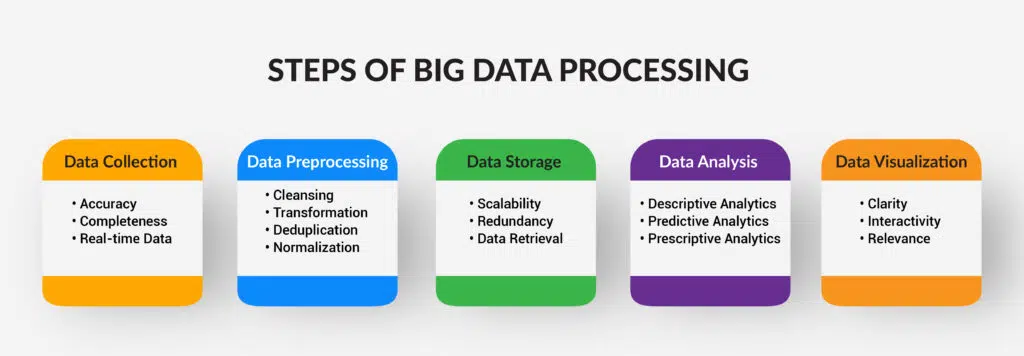
Credit: savvycomsoftware.com
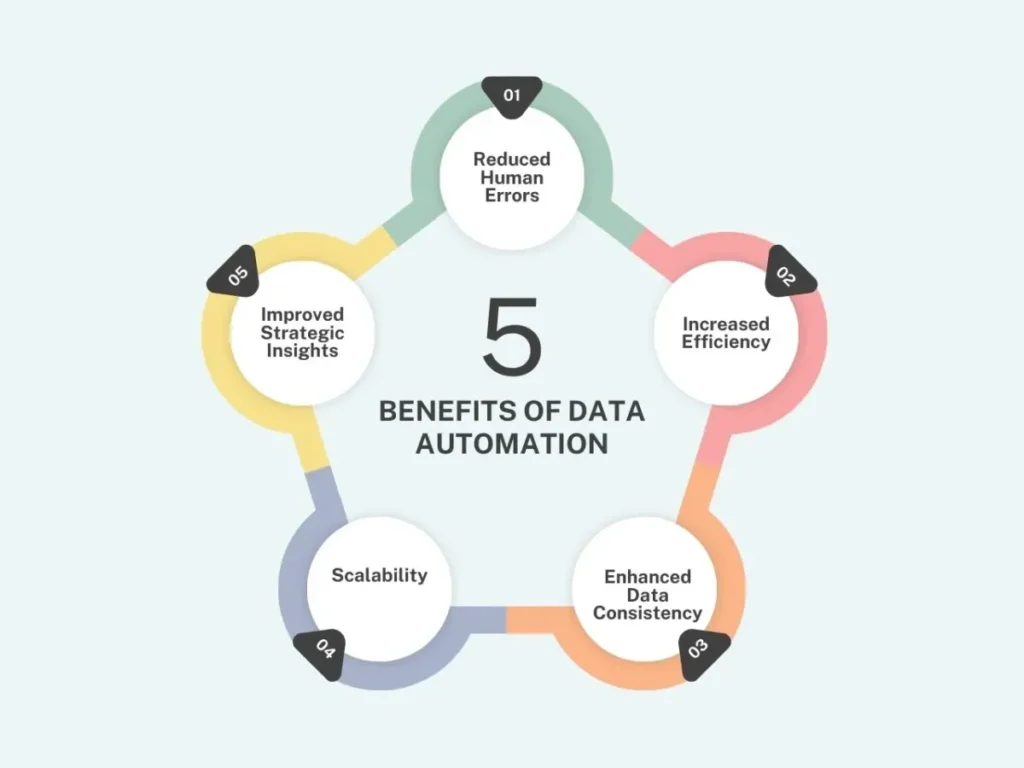
Benefits Of Automated Data Processing
Automated data processing tools help handle large amounts of data quickly and accurately. They reduce manual work and speed up tasks. These tools make data easier to manage and analyze. Many businesses use them to improve efficiency and save time.
Improved Accuracy
Automated tools reduce human errors. They follow set rules to process data consistently. This leads to more reliable results. Accurate data helps businesses make better decisions.
Time Savings
Automation completes tasks faster than manual work. It processes data in seconds or minutes. This frees up staff to focus on other duties. Companies save hours that add up to days.
Cost Efficiency
Less manual labor means lower costs. Automated tools reduce the need for extra staff. They also cut expenses on correcting mistakes. Businesses spend less while getting more done.
Better Data Management
Automated systems organize data neatly. They sort, clean, and store information properly. This makes it easy to find and use data later. Good data management supports smooth operations.
Scalability
Automation handles growing data volumes without extra effort. Tools can process more data as business grows. This helps companies keep up with demand. Scalability is key for long-term success.
Credit: savvycomsoftware.com
Types Of Data Processing Tools
Automated data processing tools help handle large amounts of data quickly and accurately. These tools reduce human effort and errors. They come in different types, each serving a unique purpose. Understanding these types can help choose the right tool for specific needs.
Batch Processing Tools
Batch processing tools handle data in large groups or batches. They process data without user interaction. Common examples include payroll systems and billing systems. These tools work best for repetitive tasks with huge data sets. They run tasks at scheduled times, saving time and resources.
Real-time Processing Tools
Real-time processing tools work on data immediately as it arrives. They provide quick results and support instant decision-making. Examples include online banking systems and stock trading platforms. These tools help businesses respond to events fast. They are critical where time is important.
Stream Processing Tools
Stream processing tools handle continuous data flows. They analyze data while it is moving through the system. Examples include social media feeds and sensor data analysis. These tools process data quickly and detect patterns in real time. They support fast insights from ongoing data streams.
Data Integration Tools
Data integration tools combine data from multiple sources into one system. They clean, transform, and organize data for easy use. Examples include ETL (Extract, Transform, Load) tools. These tools help create a unified view of data. They improve data quality and accessibility.
Key Features To Look For
Choosing the right automated data processing tool is important. The right features make tasks easier and save time. Focus on features that fit your data needs. Tools vary, so knowing what to expect helps in picking the best one.
Data Integration Capabilities
Check if the tool supports multiple data sources. It should connect with databases, files, and cloud services. Good integration means smoother data flow and fewer errors.
User-friendly Interface
The tool must be easy to use. A simple design helps users work faster. Look for clear menus and drag-and-drop options. This reduces training time and mistakes.
Automation Flexibility
Automation should adapt to different tasks. The tool should allow custom workflows and schedules. Flexibility helps handle unique data processing needs easily.
Real-time Processing
Real-time data handling is crucial for timely decisions. The tool should process and update data quickly. Fast processing keeps your information fresh and reliable.
Security And Compliance
Data security is vital. The tool must protect sensitive information. Features like encryption and access control are key. Also, ensure it meets industry rules and standards.
Reporting And Analytics
Good tools offer clear reports and insights. Look for visual dashboards and export options. This helps understand data trends and improves decision-making.
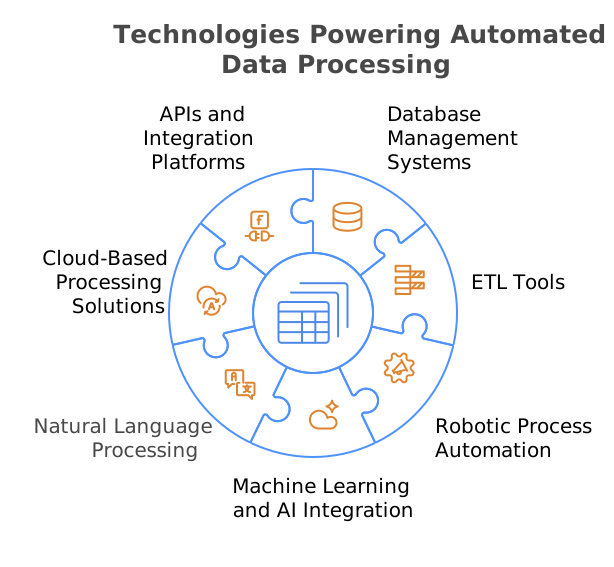
Credit: kanerika.com
Integration With Existing Systems
Integrating automated data processing tools with existing systems helps businesses save time. It allows smooth data flow between old and new software. This integration reduces errors and avoids duplicate work. Good integration means the tools work well with current software. It keeps all data in one place. Teams can access information quickly without switching platforms.
Compatibility With Legacy Systems
Many companies still use older software. Automated tools must connect easily with these legacy systems. This ensures no data is lost or corrupted. Compatibility avoids costly system upgrades or replacements.
Apis And Connectors
APIs help different software talk to each other. Automated tools often come with ready-made connectors. These connectors link tools to popular business systems. They simplify the integration process and speed up setup.
Data Synchronization
Data synchronization keeps information updated across platforms. Automated tools sync data in real-time or at set intervals. This keeps all systems accurate and consistent. Teams can trust the data they use every day.
Minimal Disruption During Integration
Good tools integrate without stopping business operations. They work quietly in the background. This reduces downtime and keeps teams productive. Smooth integration lowers stress for IT staff and users.
Common Challenges And Solutions
Automated data processing tools help handle large amounts of data quickly. Yet, users often face some common challenges. These problems can slow down work or cause errors. Finding simple solutions can improve how these tools perform. This section covers common issues and how to fix them.
Data Quality And Accuracy
Bad data leads to wrong results. Cleaning data before processing is key. Use tools that check for missing or duplicate information. Regular updates keep data accurate. Always verify results after processing. New tools might not fit well with old software. This causes delays and mistakes. Choose tools with flexible settings. Test them with current systems before full use. Ask for help from IT experts if needed.
Handling Large Data Volumes
Big data can slow down processing speed. Use tools designed for large files. Break data into smaller parts if possible. Schedule tasks during low-activity hours. This keeps systems running smoothly.
User Training And Support
Users may find new tools hard to use. Simple guides and videos help learning. Offer training sessions for teams. Support should be easy to reach. This reduces errors and boosts confidence.
Security And Privacy Concerns
Data must stay safe from theft or loss. Use tools with strong security features. Limit access to sensitive data only. Regularly update passwords and software. Monitor for unusual activity to protect data.
Case Studies Of Successful Implementation
Automated data processing tools help businesses handle large amounts of data quickly. Many companies use these tools to improve accuracy and save time. Real examples show how these tools work in real life. These case studies highlight different industries and their success stories. Each story shows clear benefits from using automated data processing. These examples help understand the practical impact of these tools.
Retail Company Improves Inventory Management
A retail company used automated tools to track stock levels. The system processed sales data every hour. It updated inventory in real time. This reduced stock shortages by 30%. The company saved money and kept customers happy.
Healthcare Provider Speeds Up Patient Data Handling
A healthcare provider automated patient record processing. The tool extracted data from forms instantly. Staff spent less time on paperwork. Errors in patient files dropped by 25%. Patient care became faster and more accurate.
Financial Firm Enhances Fraud Detection
A financial firm adopted automated data tools to analyze transactions. The system flagged suspicious activities quickly. It processed thousands of records in minutes. Fraud cases detected increased by 40%. This improved security and trust.
Future Trends In Data Automation
Data automation continues to evolve rapidly. New tools and technologies are shaping its future. These changes aim to make data processing faster and more accurate. They also help reduce manual work and errors. Understanding these trends helps businesses stay ahead.
Ai And Machine Learning Integration
Artificial intelligence improves data automation by learning patterns. It helps systems handle complex tasks without human help. Machine learning models can predict trends and detect anomalies. This makes data processing smarter and more efficient. Expect AI to play a bigger role in the future.
Real-time Data Processing
Speed matters in data automation. Real-time data processing allows instant analysis and action. This trend supports industries that need quick decisions. Tools are becoming better at handling live data streams. Businesses gain faster insights and respond to changes immediately.
Cloud-based Automation Solutions
Cloud technology offers flexible and scalable data automation. It reduces the need for physical hardware and maintenance. Cloud tools allow easy access to data from anywhere. They support collaboration across different teams and locations. Cloud adoption will keep growing in data automation.
Increased Focus On Data Security
Data automation tools handle sensitive information. Security features are becoming more important. Encryption, access controls, and monitoring protect data from breaches. Future tools will offer stronger safeguards. Trust in automated systems depends on solid security.
Low-code And No-code Platforms
These platforms make data automation accessible to non-experts. Users can create workflows with little or no coding. This lowers barriers for small businesses and teams. The trend simplifies automation and speeds up deployment. Expect more user-friendly tools in the market.
Frequently Asked Questions
What Are Automated Data Processing Tools?
They are software that handles data tasks like sorting and analyzing without human help.
How Do Automated Tools Improve Data Accuracy?
They reduce human errors by using set rules and algorithms to process data.
Can Small Businesses Benefit From Automated Data Tools?
Yes, these tools save time and cost, helping small businesses manage data better.
What Types Of Data Can These Tools Process?
They handle many types including numbers, text, images, and even audio files.
Conclusion
Automated data processing tools save time and reduce errors. They help businesses handle large amounts of data quickly. These tools improve accuracy and make work easier for teams. Choosing the right tool depends on your specific needs and goals. Start small, test different options, and see what works best.
Embrace automation to keep up with today’s fast-paced world. It’s a smart step toward better data management and success.